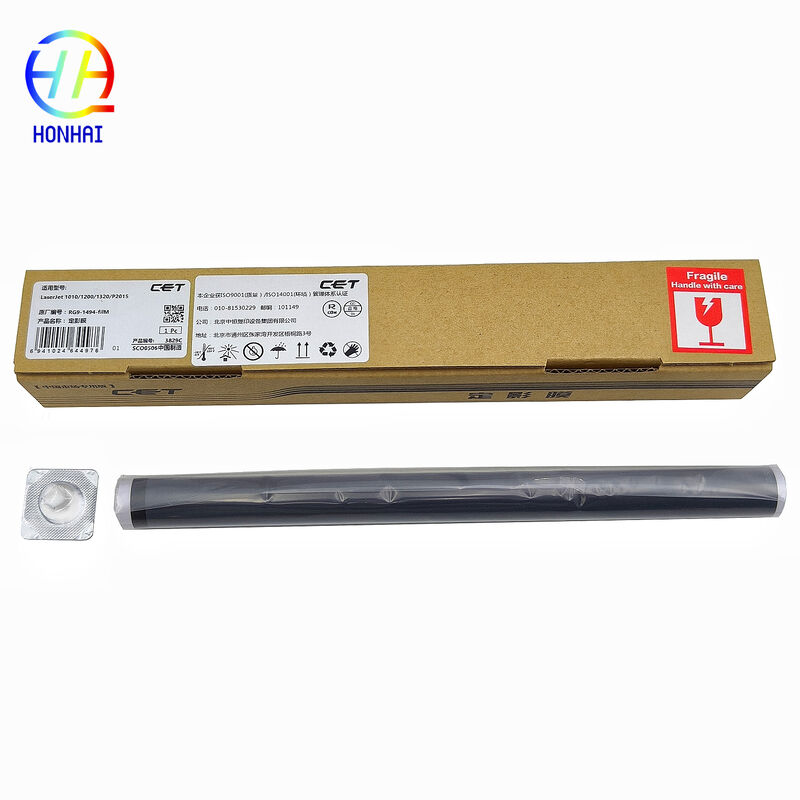
Bu verimli RG9-1494 Kaynaştırıcı Film Kılıfı, HP LaserJet yazıcınızın en iyi duruma getirilmesine ve kullanılabilirliğinin uzatılmasına yardımcı olacaktır. Bu film kılıfı, fırınlama ünitesinin önemli bir bileşenidir. Tonerin kağıda düzgün ve sıkı bir şekilde yapışmasını sağlamak için gerekli ısı ve basıncı eşit şekilde oluşturmak üzere basınç silindiri/kaynaştırıcı silindiri ile birlikte çalışır. Kaynaştırıcı bölümünde sık sık kağıt sıkışması, buruşuk çıktılar, gölgelenmeler ve kolayca silinen tonerle karşılaşıyorsanız, bu sorunları çözmenin en iyi yolu kullanılmış füzer filminizi değiştirmektir. Dayanıklılık ve kusursuz uyumluluk göz önünde bulundurularak üretilen sabitleme filmi, yüksek kaliteli basılı malzeme üretirken yazıcınızın bakımını yapmanıza ve eski HP LaserJet yazıcıların çoğunu beklenen ömrünün ötesinde kullanmanıza olanak tanır.

Hazırlık ve Sökme
Gücü Kapatma ve Soğuma: Başlamadan önce yazıcıyı kapattığınızdan ve güç kablosunu çıkardığınızdan emin olun. Kaynaştırıcı ünitesi çalışma sırasında aşırı yüksek sıcaklıklar ürettiğinden, yanıkları önlemek için lütfen makineyi kullanmadan önce tamamen soğumasını bekleyin.
Dikkatli Sökme: Kaynaştırıcı birimi muhafazasını çıkarırken plastik klipslere ve dişli konumlarına özellikle dikkat edin. Yeniden montaj sırasında sökme adımlarını tersine çevirmeniz önerilir. Kaybı önlemek için tüm vidaları, yayları ve küçük parçaları takip edin.
Çekirdek Kurulum Detayları
Isıtma Elemanını Koruyun: Eski filmin çıkarılması ve yenisinin takılması sırasında dahili seramik ısıtma elemanını son derece dikkatli tutun. Seramik elemanın çatlamasını önlemek için aşırı güç uygulamaktan kaçının.
Termal Gresi Doğru Şekilde Uygulayın: Yeni filmi takmadan önce, ısıtma elemanına ince, eşit bir tabaka halinde füzer gresi uygulayın (çok fazla kullanmayın).Önemli Not:Kaynaştırıcı filminin yüzeyi tamamen yağdan arınmış olmalıdır. Filmin yüzeyindeki herhangi bir yağ filmin kaymasına neden olacak ve ciddi kağıt sıkışmalarına yol açacaktır.
Yönü ve Pürüzsüzlüğü Kontrol Edin: Yeni füzer filminin doğru yönde takıldığından ve herhangi bir kırışma olmadan düz durduğundan emin olun. Kurulumdan sonra, herhangi bir direnç olmadan düzgün bir şekilde hareket ettiğinden emin olmak için elinizle birkaç kez yavaşça döndürün.
İlgili Parçaların İncelenmesi: Alt basınç silindirinin burçlarının ve mil göbeğinin aşınma açısından kontrol edilmesi önemle tavsiye edilir. Önemli aşınma varsa bunları değiştirin ve sürtünmeyi azaltmak ve yeni filmin zarar görmesini önlemek için uygun miktarda yağlayıcı uygulayın.
Kurulum Sonrası Test
Kuru Çalıştırma / Otomatik Kontrol: Tüm bileşenleri yeniden birleştirdikten sonra hemen yazdırmayın. Makinenin kendi kendini kontrol döngüsünü tetiklemek için yazıcının ön kapağını açıp kapatın. Kaynaştırıcı filminin içeri girip düzgün bir şekilde yerleşmesini sağlamak için yazıcının 3-5 boşta kalma döngüsü boyunca çalışmasına izin verin.
Test Sayfalarını Yazdır: Prova başarılı olduktan sonra, baskı kalitesinin net olduğundan ve kağıt sıkışması olmadığından emin olmak için birkaç test sayfası yazdırın.
Kirlenme Önleyici ve Satın Alma İpuçları
Yağ Kirliliğinden Kaçının: Yeni füzer filmini tutarken temiz eldiven giymeniz önerilir. Bu, basılı belgelerinizde periyodik siyah noktalara neden olabilecek cilt yağlarının filme bulaşmasını önler.
Modeli ve Boyutu Doğrulayın: Bu film çeşitli modellerle uyumlu olmasına rağmen, farklı yazıcı grupları arasında küçük farklılıklar olabilir. Satın almadan önce, eski filminizin parça numarasını doğrulamak veya mükemmel uyum sağlamak için genişlik ve uzunluğu karşılaştırmak en iyisidir.


 Mesajınız 20-3.000 karakter arasında olmalıdır!
 english
 français
 Deutsch
 Italiano
 Русский
 Español
 português
 Nederlandse
 ελληνικά
 日本語
日本語
 한국
한국
 العربية
 हिन्दी
 Türkçe
 indonesia
 tiếng Việt
 ไทย
ไทย
 বাংলা
বাংলা
 فارسی
فارسی
 polski